Shoes 2

It’s hard to believe this is my second blog on the topic of shoes – when this is a software development blog.

I recently discovered the BBC Archive channel which shows clips from back in the day. This one is from 1987 for “Smart Trainers”.

It’s interesting how they were trying to make products like this 35 years ago. I don’t think it’s very practical for outside use though, I wouldn’t trust it in water. It’s probably just designed for gym use only.

It’s funny how he doesn’t successfully demo it. I did wonder if it was just taking a long time to load and he didn’t have time, or if the program had legitimately frozen. Either way, the product didn’t seem very appealing. Wearable tech such as wristbands seem much more practical than Smart Trainers.

For Star Wars fans, I also liked this interview with Carrie Fisher and Mark Hammill

Game Review: Say No! More

My previous blog was a review for the game “Game Dev Tycoon” which was relevant to this blog due to being directly about software development. “Say No! More” isn’t about software development, but it is about office culture and seems like a social commentary on people being overly obedient to please managers in order to progress through the hierarchy.

You play as an office intern who starts a new job alongside two others. The boss introduces the company and jokes that you have to say “yes” to go far. One of the interns is excited because she is someone who loves saying “yes” and pleasing managers.

Your character struggles to speak but he soon finds a cassette player with a motivational tape which teaches him to say “No” with confidence.

This manager has left his lunchbox at home so he steals yours. This leads you to chase him to his office to get it back, but you are constantly stopped by your colleagues with random requests. You shoot them down with your newly learned word: saying “no”.

“Can you get me a coffee?” “no!”

“Can you copy these documents?” “no!”

There’s even a few dialogues where you can wait for something different to happen, but there’s no negative repercussions if you do say “No” to them. The movement is automatic with on-rails movement and you just press a button to say “no” and move on.

In each chapter, your character listens to more of the motivational tape, and so he learns new powers like charging up your “NO” for a more forceful statement, or sarcastically laughing, clapping or nodding which catches people off guard, allowing you to shout them down. You also learn different tones: cold, heated, crazy, lazy. However, it doesn’t actually make a difference even though the Tutorial makes out that these different types are necessary against some people.

The game hasn’t really got any gameplay, it’s more of a humorous experience, relying on the comedy, quirkiness, and the ragdoll/destruction you see when you say “no” and knock them down.

I say it does succeed; it did keep me entertained for the 1.5 hours. If it was longer, then it would become tedious. It reminds me of Weebl’s cartoons; its wacky style, combined with some of the “No” voice samples which sounds like “Weebl and Bob“‘s way of speaking.

Game Review: Game Dev Tycoon

Since Game Dev Tycoon is about software development, I decided to review it and put it on this blog.

Game Dev Tycoon is a simulation game with a game development theme. You start off as a solo developer in your garage, making simple games in order to raise money to expand. Once you have accumulated enough wealth, you can purchase a new office which allows you to hire more developers and work on more complicated games. Later, a larger office is available which allows you to hire even more staff, and even have a Research, and Hardware labs (as long as you have a Design and Technology specialist).

When you start to make a game, you choose the game’s name, pick the Size (you start off with Small, then unlock further sizes as you progress), Topic (theme), Genre and Platform. A later upgrade allows you to choose the target audience; Young, Everyone, Mature. Then there’s 3 stages of development where you move sliders and choose extra features. 

  1. Engine, Gameplay, Story
  2. Dialogues, Level design, AI
  3. World Design, Graphic, Sound.

You move the sliders based on your assumption of the genre (RPGs have an emphasis on Story, Simulation requires Engine), and by the results and feedback of your released games. After release, you can then generate a game report which will give you hints on which aspects are important, and if the target audience and platform fit the style of game and theme.

For medium sized projects and above, you have to assign a developer to lead the development for each aspect. Adding additional features (e.g. Soundtrack, Surround Sound) and using game engines comes at a cost, but the more features usually means a better quality game. It’s not clear how random a lot of these elements are though, or if certain tech affects the genres differently.

Once you have created your game, you can wait a bit longer to put the finishing touches. The number of bugs will decrease and you can add extra points to Design, Technology. When you click “Release”, you will be given a review score and your staff experience within all aspects will increase. 

Money will come in from the sales with declining sales over time, and then the game is removed from the market. Your staff wages increase as they level up, and the general cost of development means it’s a good idea to have a large surplus of money if you can. If you do drop into negative figures you can get offered a short term loan but with extremely high interest. If you can’t afford that, then you are bankrupt. You are allowed to restart from your last save, the last office move, or you can just start again. The game can be tricky if you don’t land those big revenues at the right time.

As time progresses, games take longer to develop, require more staff and cost way more money. This is like real life when early computer games were developed by tiny teams over a few months. Those games may have been text only, or had primitive graphics with colours, but that was what the consoles could handle back then. Today’s “AAA” games take years to develop but have cutting-edge graphics and sound. So in this game you need to hire more staff, keep training their skills, and make sure you have the staff in the right areas. You can only have 1 game in development at any time.

As time progresses, new technologies become available for research, and Platforms are released or removed from the market. After a new Platform has been released, you can then buy a Development Licence to make games on that Platform (it would have been a nice idea to be able to work on games for the actual console launch though, then you would have the challenge of rushing your game out). The names and images of the consoles are slight variations to avoid copyright issues (or add humour to the game) but it’s easy to recognise what they are supposed to be. Each console is biassed towards certain genres and audiences. You start with the PC and Commodore, and it progresses to modern day with the Xbox Series and PS5.

You can take on simple contract work which gives you a small amount of money for a small amount of your time. The main advantage is to acquire more Research points. You can also develop games for Publishers but must create the game at a certain quality in order to receive the full amount. These contracts are more beneficial when you haven’t accumulated enough fans. Later on when you do have many fans, even mediocre games seem to sell themselves.

With your Research points, you can send your employees on training courses. You can Research new topics (which seems like a randomly ordered large list which is unlocked in batches), and technology. Once you have researched some more technology (mainly the improved graphics), it’s often beneficial to create a new Game Engine so you can use these features.

The Research room takes a lot of money to use. Even moving the slider slightly will cost $300k or so per month. You can research a Steam-like platform, the ability to make your own console in the Hardware Lab, create MMOs and a few other options. It’s quite hard to acquire these aspects before the game “ends”. You can carry on playing but new consoles won’t be released and there’s no “events” that trigger. 

There’s not many Genres but there are loads of Topics. However, I think some of the Topics should be classed as Genres such as “Racing” or “Sports”. Two other Genres that seem obvious to include would be Platforming and Puzzle.

I also wondered how the developer interpreted the genres especially when you unlock the ability to choose 2 genres (you cannot have multiple topics though). For example: what does “Adventure” mean? My assumption would be a point-and-click adventure such as Monkey Island, but then what does RPG-Adventure combo mean? Is such a combo doomed to fail, or do the developers have a different idea what this actually means? Maybe a certain Topic could fit this genre well? Casual is also down as a Genre, but I’d say this is closely tied to the size of a game. You don’t get major budget Casual games, although something mid-range like Animal Crossing. For the most part, the decisions seemed logical, but there’s probably some Topic-Genre combos that you won’t agree with because it is fairly subjective.

Just like most simulation games, I found myself playing for hours at a time and found it hard to put it down. It’s simplistic and definitely not for everyone, but I found it addictive and satisfying watching those number-bubbles float to the top and increment those total counts as your developers work on the game.

8/10

Troy Hunt: The Responsibility of Disclosure

Troy Hunt is a cyber security expert and creator of the popular website Have I Been Pwned. I do read his blog and listen to his podcast in which he mainly discusses cyber security (obviously) but also discusses some life events and hobbies.

YouTube recommended me a presentation he did for AusCERT2017 about responsible disclosures. It’s actually an interesting topic how some companies are very welcoming for people to report security vulnerabilities, whereas others are very distrusting and can threaten to sue.

You can watch the presentation in full:

AusCERT2017 Day 1 Troy Hunt: The Responsibility of Disclosure

Otherwise, here is a summary of the presentation.

He begins by telling a story of how someone found a security vulnerability on a website, extracted loads of data, used some of the login credentials to get in. He filmed it all and put it on YouTube. He got arrested.

Even though someone like that could claim to not be malicious, he would clearly violate some laws like Computer Misuse Act.

  • So how can you investigate a security flaw?
  • How can you disclose it?
  • Where is the line between being responsible and irresponsible?

Troy has a “Sinéad O’Connor” test. Enter her name in the data entry field of the website. If the apostrophe in a name gives you an SQL error, then you know there is a vulnerability – it is prone to SQL injection. You don’t need to go any further and actually carry out the attack; illegally accessing data to prove it.

If you grab 1 record, the company is obligated to disclose this to the user who lost their data. If someone takes 10,000 records, it’s a bigger problem and more inconvenient to the company. Just 1 unauthorised access to a record sufficiently illustrates the point. Accessing more than you need is more likely to be met with a negative response and possible legal action.

He then goes through some more notable examples and attitudes to the disclosure:

PayAsUGym got breached and ignored the hacker. Although the hacker was trying to extort money, by ignoring them completely, PayAsUGym had no idea how bad the breach was. Initiating the dialogue could have at least given them more information to attempt to limit the damage.

Cloud Pets had a security flaw in their toy, but also had a publicly exposed MongoDB database which attackers wiped and ransomed. Later on, when journalists contacted the owner, he responded

you don’t respond to some random person about a data breach“.

Spiral Toys CEO

As Troy says, random people are exactly the people that will tell you about a problem.

Australian Red Cross Blood Service disclosed their breach very quickly, put out communication through multiple channels, and apologised. Troy was impressed with this response. The problem was a third-party who placed backups on a public-facing server so they could have easily downplayed it or passed the blame.

For more info, Troy also has a blog about disclosures, including the example of Cloud Pets.

Jurassic Park: The Software Issues

I read Michael Crichton’s Jurassic Park recently.

:dinosaur:

It seems obvious to the average person that a dinosaur park containing vicious species such as the acid-spitting Dilophosaurus, the intelligent hunters Velociraptor, aggressive flying Pterodactyls, and the ferocious Tyrannosaur was going to end in disaster.

A more docile park could work as long as other mistakes aren’t made. If we ignore the dangerous dinosaurs, it’s essentially poor software and a malicious developer that is Jurassic Park’s downfall.

The software controlling the automation contains many bugs and is also closely tied to the security and surveillance system. Computer programmer Dennis Nedry is brought to Isla Nublar to fix some bugs and add improvements. However, he uses his access privileges to take down the system which allows him to physically access restricted areas and steal the dinosaur eggs.

So the software is bad architecturally from a security aspect, but then Nedry was a malicious insider that abused this software flaw. The power outage and the aggressive dinosaurs is the main catastrophe that happens, but there’s also the existing issue of dinosaurs leaving the island undetected.

They don’t realise the dinosaurs have been breeding because of the way the software is designed. The user has to enter a number for the expected number of dinosaurs, then the park is scanned and stops counting when it finds that amount; so the system can only report that same value or fewer. This efficiency was added because the scientists have only cloned female dinosaurs – so it is “impossible” for them to breed. However, the dinosaurs can change their sex due to a type of frog DNA also being used in the genetic cloning process. This means some dinosaurs have switched sex to male, and have been breeding. The increased population has gone undetected, and some dinosaurs have been hitching rides on the ferry off the island.

This is definitely a cautionary tale of software issues.

Windows 11 Initial Impressions

A few months ago, my laptop said Windows 11 was ready to install. Since it seemed it had already downloaded it, I decided to accept and schedule the install. The installation seemed to be going fine, but eventually rolled back and gave me a very generic looking error code.

After a quick Google for the error code, the suggestion was that there could be many reasons; but a common one was lack of free disc space. Now, I did only had 5GB after the download, but I would have thought that

  • A) it would check before saying it was “ready”
  • B) if it did fail because of lack of space – you would get a specific error.

So I freed up some space and looked for the option to try again. The option wasn’t there. I clicked around in the Windows Update menu. Nothing.

A month later, my laptop prompted me to install again, and this time it was successful.

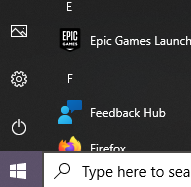
I do wonder if there’s a rationale for certain changes. In Windows 8, they decided to remove the Start button and people demanded it back. Now in Windows 11, they are centring the task bar by default (you can change it if you wish). It will take a while to get used to, but maybe it’s easier to access rather than moving the mouse to the corner. One thing that is annoying though, is that the Power icon used to be directly above the Start button, so you could move your mouse slightly click, then move mouse slightly and click to Shutdown. Now they have moved the Power button to the other side. Is there rationale for that, or was it an oversight?

0 
Epic GameS [дип 
Feedback НиЬ 
Я) Туре here to seE
Windows 10. Super convenient to Shutdown
Windows 11: You’re gonna have to move aaaaaaaall the way to the right.

Pre Windows 10, I used to use ctrl+alt+del to access the Task Manager. Since then, I have adapted to just right click the Task bar then select Task Manager. They have removed it, but why? Now you just get “Taskbar settings”.

I always liked having the Icons with Text on the taskbar. Now you can only have icons. Why isn’t there an option in the settings? Surely that’s not an oversight, they have intentionally removed that. Why?

I intermittently remember that a cool way of minimising all windows is to grab one window and shake it with your mouse. This feature is off by default. You have to turn the feature on in the Settings menu. It is called “Title bar window shake”.

The biggest annoyance is that windows no longer maximise when you drag files to them on the taskbar. I used to have a program open like VLC Media Player, go grab an MP3, hover over VLC, it would maximise, allowing me to drop the file in. Now you have to have a program open but windowed; open file explorer, then drag the file in, then maximise the program if you wish. I don’t understand how that has been missed when developing, and going through all the stages of testing. I noticed it on Day 1.

Microsoft are boasting about a more consistent aesthetic, and a new sleeker look with rounded corners. Previous Operating Systems had a mix of aesthetics due to some dialogs being remnants of the older OS like XP, 7, 8 etc. Now everything looks the same. Or so they claim. They have definitely missed some, Device Manager being one example. This is annoying for those that like a certain colour scheme like a Dark Mode, then when opening Device Manager, it’s going to be White themed because it’s a legacy dialog.

A criticism other people have is that Microsoft are more pushy to use their ecosystem. It’s almost vital to have a Microsoft Account. Microsoft Edge is your default browser and cannot be uninstalled. It can be changed but the experience is a bit more clicky to change the Default App settings. Then there’s quite a few Diagnostic data collection options that are enabled by default.

I tend to use my laptop for simple stuff like for Web Browsing, and writing blogs. I have a PC for gaming. I have played a few games on Windows 11 though and it ran fine, and haven’t had any problems with incompatibility. I heard that the “drag and drop maximise window issue” is going to be fixed in an upcoming update. Hopefully, they can add the Task Manager option in, and give more customisation of the Taskbar in general.

Dealing With Software Support #2

I recently had to deal with another company’s software support team, and this was the second bug I had logged. The first bug didn’t go well at all. For this second issue, I had provided them detailed recreation steps, and videos of the issue occurring.

After I logged the issue, they said they would investigate and get back to me shortly. After nearly 2 weeks, I received an email requesting to arrange a phone call. I thought he was going to give me some news but he wanted me to demo it. So I asked him what that would give him over the videos. He said the videos I sent him wouldn’t play. Brilliant.

I didn’t understand why the videos won’t play. I recorded them using the Microsoft Game Bar feature and they ran fine on my machine. Instead, he wanted me to record the video with Powerpoint. This is bonkers. At least I learned that Powerpoint can record screens. It’s quite useful because you can zone out a tiny part of your window to record…but then there is no option to simply record the full screen!

The problem we had was that our software was intermittently crashing when it was interacting with theirs. However if you changed some Security settings in their software to “never warn me about suspicious activity”, then the crash didn’t occur. You would have thought it should pop up a message box rather than crash. So I asked their Support specifically if he had any idea why this would happen. If it was something I could change at our end, then maybe I could quickly resolve the issue.

“Our software may be thinking this 3rd party app is suspicious. And disabling that security setting helps!”

Support

Well, that sure was helpful. I bet he referred to Captain Obvious for that one.

Why is it intermittent? Why would it think our application is suspicious? why would it crash instead of popping up a message if it was suspicious? My line of questioning is to prompt him into getting to the bottom of the issue but it seemed he couldn’t be bothered investigating or even logging it with their Development team with this information.

I was also annoyed how he kept on chasing my responses when I’d barely had any time to respond. In his email signature, it said he was working 9-5:30 Monday to Friday, and he sometimes sent emails at 8pm on a Friday. Then I’d also get an email 9am Monday reminding me that I haven’t replied to his last email. If he doesn’t work weekends, why does he assume I do? He has literally given me 0 working hours to respond. 

There were even occasions where he wouldn’t even chase me by email, but would chase me up by an actual phone call that I didn’t agree to. We had put our IT’s department’s phone number on the Support ticket. I told him many times to contact me by email, but we can arrange a Microsoft Teams call if we need to talk. He would then email saying he couldn’t get through by phone. So I would remind him

“The phone number is for our IT department. I don’t have a direct number.”

Then he would sometimes respond with something similar to:

“We tried to connect you by phone, but unfortunately unable to connect”

Support

Absolute wind-ups.

I find that they always want to arrange calls, even though they end up asking something that can have been addressed by email. They must get reviewed by how many calls they make or something. I don’t understand the advantages. Being put on the spot to give information over the phone isn’t as effective as asking in an email and waiting for the person to have time to acquire the information when they are free. But maybe that’s just my preference? Still, they should respect the customer’s preferences.

At one point, he suggested that the reason why some users didn’t encounter the issue was due to a different “Microsoft .Net Framework” version installed on their machine. I asked him the best way of finding this information out. He replies with the following: 

I found the framework version in the error listed in Event Viewer for the affected machine. You can check if they are different by comparing a working machine and non-working machine.

Support

Do you see a flaw in their plan?

A working machine doesn’t log an error in the Event Viewer:smile:

Unity Learn

Recently, I’ve been learning game development using the Unity game engine. Unity have made their learning platform “Unity Learn” free of charge since the start of lockdown.

The first learning pathway was very good, but the next one started off well, then seemed a bit of a random collection of lessons from various content authors. 

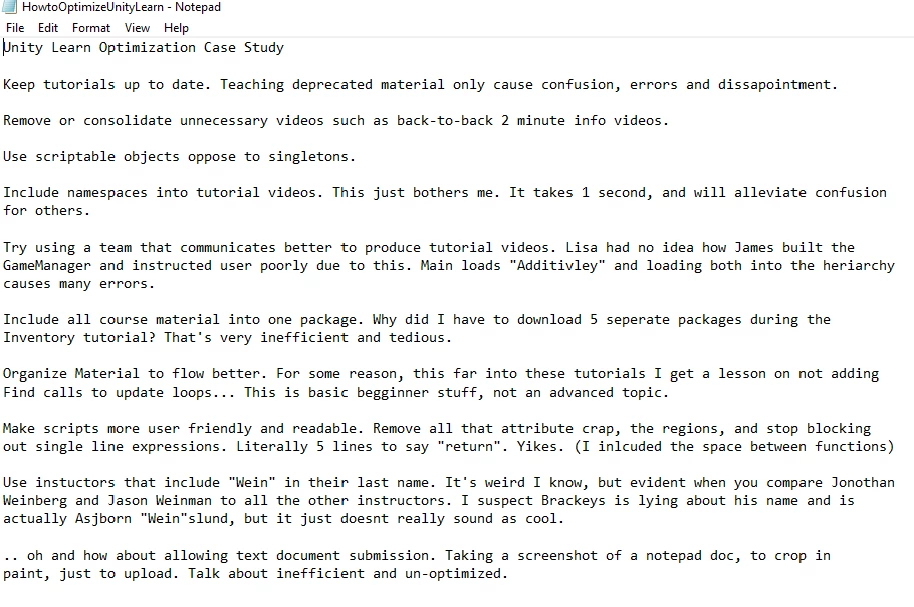
Some of the lessons are more about process, rather than writing code, and occasionally you are asked to submit something to demonstrate you have followed it. However, you could literally upload a blank file and it will accept it, so it is a bit pointless. Also, some of the file restrictions are a bit odd. On the challenge where you are supposed to research some ways of improving optimisation, you were asked to upload an image rather than a text document. 🤷

Once submission made me laugh, because it wasn’t about optimisation like Unity asked for, but instead, he gave a critique of Unity Learn.

He does make some good points, and I suppose most of these will only make sense if you follow the course. I’ve explained his final point though.

https://learn.unity.com/submission/60616140edbc2a2e6e4a24e5

I have watched quite a lot of Jason Wiemann and Brackeys. It’s a shame Brackeys stopped making videos though.

Star Wars: Knights Of The Old Republic II

Recently, I’ve been playing Knights Of The Old Republic II. On one of the missions, you board a spaceship with 2 party members with the aim of rescuing your main character. Whilst playing, the game crashed, and when I reloaded, I was controlling a character I didn’t recognise.

They had no equipment, average attributes, but what looked like fully maxed out skills. I was quite intrigued by the female portrait (my original character was male, and this newly generated character was also male).

When I went to the screen where it showed the party members, I saw the text:

“I am broken. So very, very broken”

It made me wonder how this came about. Was it some error the developers encountered but didn’t know how to fix? Or is it the case that they just put this code in just in case the game actually ever got into this state?

I didn’t bother carrying on to see what would happen. I did try reload a few times to see if it fixed the problem, but sometimes the loading screen would freeze. I loaded an earlier save and replayed the 20 mins I had lost.

Integer Overflow – Zaccaria Pinball

Zaccaria Pinball is a pinball game you can buy on Steam. User Breeze posted this screenshot of his score: 1,947,658,906. A negative score!

 What happened is that he has reached the maximum score, then it suddenly becomes negative.

I don’t know what language Zaccaria Pinball is programmed in, but in C#, the maximum value of an “int” type is 2,147,483,647. So I imagine he has surpassed the current record, then suddenly it flipped to the record low score. He must be furious.

It is important you choose the correct datatype to store data correctly. Often on pinball games, people amass some crazy scores that you don’t think are possible, so it would probably make sense to go for the “long” type which has a max of 9,223,372,036,854,775,807. Hopefully the developers change this before annoying more players.