
A few months ago, my laptop said Windows 11 was ready to install. Since it seemed it had already downloaded it, I decided to accept and schedule the install. The installation seemed to be going fine, but eventually rolled back and gave me a very generic looking error code.
After a quick Google for the error code, the suggestion was that there could be many reasons; but a common one was lack of free disc space. Now, I did only had 5GB after the download, but I would have thought that
- A) it would check before saying it was “ready”
- B) if it did fail because of lack of space – you would get a specific error.
So I freed up some space and looked for the option to try again. The option wasn’t there. I clicked around in the Windows Update menu. Nothing.
A month later, my laptop prompted me to install again, and this time it was successful.
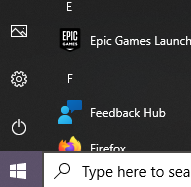
I do wonder if there’s a rationale for certain changes. In Windows 8, they decided to remove the Start button and people demanded it back. Now in Windows 11, they are centring the task bar by default (you can change it if you wish). It will take a while to get used to, but maybe it’s easier to access rather than moving the mouse to the corner. One thing that is annoying though, is that the Power icon used to be directly above the Start button, so you could move your mouse slightly click, then move mouse slightly and click to Shutdown. Now they have moved the Power button to the other side. Is there rationale for that, or was it an oversight?

Pre Windows 10, I used to use ctrl+alt+del to access the Task Manager. Since then, I have adapted to just right click the Task bar then select Task Manager. They have removed it, but why? Now you just get “Taskbar settings”.
I always liked having the Icons with Text on the taskbar. Now you can only have icons. Why isn’t there an option in the settings? Surely that’s not an oversight, they have intentionally removed that. Why?
I intermittently remember that a cool way of minimising all windows is to grab one window and shake it with your mouse. This feature is off by default. You have to turn the feature on in the Settings menu. It is called “Title bar window shake”.
The biggest annoyance is that windows no longer maximise when you drag files to them on the taskbar. I used to have a program open like VLC Media Player, go grab an MP3, hover over VLC, it would maximise, allowing me to drop the file in. Now you have to have a program open but windowed; open file explorer, then drag the file in, then maximise the program if you wish. I don’t understand how that has been missed when developing, and going through all the stages of testing. I noticed it on Day 1.
Microsoft are boasting about a more consistent aesthetic, and a new sleeker look with rounded corners. Previous Operating Systems had a mix of aesthetics due to some dialogs being remnants of the older OS like XP, 7, 8 etc. Now everything looks the same. Or so they claim. They have definitely missed some, Device Manager being one example. This is annoying for those that like a certain colour scheme like a Dark Mode, then when opening Device Manager, it’s going to be White themed because it’s a legacy dialog.
A criticism other people have is that Microsoft are more pushy to use their ecosystem. It’s almost vital to have a Microsoft Account. Microsoft Edge is your default browser and cannot be uninstalled. It can be changed but the experience is a bit more clicky to change the Default App settings. Then there’s quite a few Diagnostic data collection options that are enabled by default.
I tend to use my laptop for simple stuff like for Web Browsing, and writing blogs. I have a PC for gaming. I have played a few games on Windows 11 though and it ran fine, and haven’t had any problems with incompatibility. I heard that the “drag and drop maximise window issue” is going to be fixed in an upcoming update. Hopefully, they can add the Task Manager option in, and give more customisation of the Taskbar in general.
 Stranger Coding Tings